
Decoupling WordPress: A Modern Guide to Headless CMS Architecture
Learn whether decoupling WordPress creates enough business and technical value to justify the additional architectural complexity.


Article Contents
- •What Does "Headless WordPress" Actually Mean?
- •Why Enterprises Are Decoupling WordPress
- •Traditional WordPress vs. Headless Architecture
- •When Headless WordPress Makes Sense
- •Headless Is Not Automatically Better
- •Designing the Content Layer
- •Think in Content, Not Pages
- •Avoid Overly Generic Content Models
- •WordPress APIs and the Content Boundary
- •Treat the API as a Product Boundary
- •Caching and Performance
- •Cache Content Aggressively Where Appropriate
- •Handle Content Changes Intelligently
- •Building a Fast Headless Experience
- •SEO in a Headless WordPress Architecture
- •Preview and Editorial Workflows
- •Authentication and Security
- •Search and Personalization
- •Media and Asset Management
- •Deployment and Infrastructure
- •Common Headless WordPress Mistakes
- •A Modern Headless WordPress Architecture
- •How to Plan a Migration
- •Measuring the Business Impact
- •Making the Call
- •Final Takeaway
WordPress has spent decades evolving from a blogging platform into a powerful content management system used by publishers, enterprises, commerce brands, universities, media organizations, and global marketing teams. But the traditional WordPress architecture tightly connects content management with presentation. That model works extremely well for many websites—but it can become limiting when organizations need highly interactive frontends, multiple digital channels, advanced performance, independent deployment cycles, or a modern application architecture. Headless WordPress changes that relationship. Instead of asking WordPress to render every page, the CMS becomes the content engine while a separate frontend consumes content through APIs. This creates a more flexible architecture, but it also introduces new responsibilities around caching, previewing, authentication, search, SEO, deployment, and content modeling. The real question is not whether headless WordPress is more modern. It is whether decoupling creates enough business and technical value to justify the additional architectural complexity.
What Does "Headless WordPress" Actually Mean?
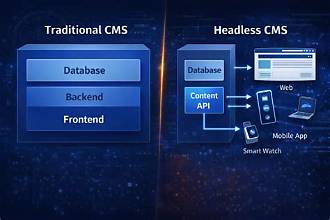
Traditional WordPress combines two major responsibilities:
WordPress
│
├── Content Management
│
└── Page Rendering
Editors create content and WordPress also generates the HTML that users see.
A headless architecture separates those responsibilities:
                WordPress
             Content Platform
                    │
                    │ API
                    ▼
              Frontend App
                    │
                    ▼
                  Users
WordPress manages:
Content
Media
Editorial workflows
Users and roles
while another application handles:
Rendering
Interaction
Routing
Frontend performance
User experience
The frontend could be built with technologies such as React, Next.js, Vue, Nuxt, or another framework appropriate to the product.
The important idea is:
WordPress becomes the content source instead of the presentation layer.
Why Enterprises Are Decoupling WordPress
Traditional WordPress is remarkably capable.
For many organizations, there is no reason to replace it.
But larger digital products may have requirements that push beyond the traditional model.
For example:
Highly interactive interfaces
Multiple frontend applications
Mobile and web content reuse
Global performance requirements
Independent frontend deployments
Custom application experiences
Complex personalization
Integration with enterprise platforms
A traditional architecture might be:
Browser
   ↓
WordPress
   ↓
Database
A headless architecture becomes:
Browser
   ↓
Frontend
   ↓
Content API
   ↓
WordPress
   ↓
Database
This adds a layer—but it also creates a cleaner separation of responsibilities.
Traditional WordPress vs. Headless Architecture
Traditional
User
 ↓
WordPress
 ├── Theme
 ├── Plugins
 ├── PHP
 └── Database
 ↓
HTML
The theme controls the presentation.
This model is simple, mature, and supported by a huge ecosystem.
Headless
Content Editor
      ↓
WordPress
      ↓
API
      ↓
Frontend
      ↓
User
The frontend and CMS can evolve independently.
For example:
Content Team
    ↓
WordPress

Frontend Team
    ↓
React / Next.js
The teams can work with clearer ownership boundaries.
When Headless WordPress Makes Sense
Headless architecture can be particularly valuable when an organization needs:
Multiple Channels
WordPress
   │
   ├── Website
   ├── Mobile App
   ├── Digital Display
   └── Partner Portal
The same content can be delivered through different experiences.
Advanced Frontend Experiences
If the frontend behaves more like an application than a traditional website, a dedicated frontend framework may be useful.
Examples include:
Interactive product configurators
Personalized dashboards
Complex search experiences
Rich commerce experiences
Highly interactive media platforms
Independent Release Cycles
The frontend can be deployed without changing the CMS.
Content Deployment
      ≠
Frontend Deployment
This can be valuable for organizations with separate product and content teams.
Headless Is Not Automatically Better
This is one of the most important points.
A headless architecture introduces additional moving parts.
You may now need to manage:
Frontend hosting
API communication
Caching
Preview infrastructure
Authentication
SEO
Search
Media delivery
Monitoring
The traditional model might be:
One PlatformThe headless model becomes:
CMS
 +
Frontend
 +
API
 +
CDN
 +
Hosting
 +
Observability
The architecture is more flexible—but also more complex.
Designing the Content Layer
The success of a headless implementation depends heavily on content modeling.
Do not simply reproduce website pages as giant blobs of content.
Instead, model reusable content entities.
For example:
Article
├── Title
├── Summary
├── Author
├── Image
├── Body
└── Related Content
Then:
Product
├── Name
├── Description
├── Images
├── Specifications
└── Related Products
The content model should describe the information—not the exact pixels of one frontend.
Think in Content, Not Pages
Traditional CMS thinking often starts with:
"Create a page."
Headless architecture works better when the question becomes:
"What content does the business need to manage and distribute?"
For example:
Content
├── Hero
├── Article
├── Author
├── Product
├── FAQ
└── Promotion
The frontend decides how those content objects are presented.
This makes content more reusable across channels.
Avoid Overly Generic Content Models
There is another extreme.
A model such as:
Block
├── Type
├── Value
├── Configuration
└── Metadata
can become so generic that editors no longer understand what they are managing.
Good content models balance:
Flexibility
with:
Editorial clarity
The content team should be able to work comfortably without needing developers for every change.
WordPress APIs and the Content Boundary
WordPress provides API-based access to content, making it possible for an external frontend to retrieve:
Posts
Pages
Media
Taxonomies
Users
Custom content
depending on how the application is configured.
A typical flow looks like:
Frontend
   ↓
Content Request
   ↓
WordPress API
   ↓
Content
   ↓
Frontend Rendering
The API becomes the contract between the CMS and the application.
Treat the API as a Product Boundary
Do not allow the frontend to become tightly coupled to the internal WordPress implementation.
Prefer:
Frontend
   ↓
Content Contract
   ↓
WordPress
rather than:
Frontend
   ↓
WordPress Internal Structure
This makes it easier to change plugins, data models, or internal implementation details later.
Caching and Performance
One of the strongest reasons organizations choose headless architecture is performance.
But simply separating the frontend from WordPress does not automatically make a website fast.
A poorly designed headless application can still be slow.
A modern architecture might use:
User
 ↓
CDN
 ↓
Frontend Cache
 ↓
Content API
 ↓
WordPress
The goal is to avoid asking WordPress for the same content on every user request.
Cache Content Aggressively Where Appropriate
Editorial content is often highly cacheable.
For example:
Article
   ↓
Published
   ↓
CDN Cache
   ↓
Thousands of Users
Instead of:
1000 Users
   ↓
1000 WordPress Requests
you can serve cached content efficiently.
This can reduce:
Database load
API traffic
Origin requests
and:
Response latency
Handle Content Changes Intelligently
Caching introduces an important problem:
What happens when an editor publishes an update?
The system needs a mechanism for refreshing affected content.
A common pattern is:
Editor Publishes
      ↓
Content Event
      ↓
Cache Invalidation
      ↓
Updated Frontend
This allows aggressive caching without forcing content to remain stale indefinitely.
Building a Fast Headless Experience
A modern frontend can combine:
Server rendering
Static generation
Incremental regeneration
Streaming
CDN caching
Image optimization
Code splitting
The correct strategy depends on the content.
For example:
Marketing Page
   ↓
Static / Cached

News Article
   ↓
Cached + Revalidated

Personal Dashboard
   ↓
Dynamic Rendering
The key is matching the rendering strategy to the content's behavior.
SEO in a Headless WordPress Architecture
SEO is one of the areas that requires careful planning.
Traditional WordPress provides many SEO capabilities through themes and plugins.
When decoupling, the frontend becomes responsible for ensuring that search engines receive:
Correct titles
Meta descriptions
Canonical URLs
Structured data
Open Graph metadata
Sitemaps
Robots directives
A headless architecture should therefore treat SEO as a first-class frontend capability.
Rendering Matters for Search
If important content is only available after client-side JavaScript executes, search visibility can become more complicated.
For content-heavy websites, server-side or pre-rendered experiences are often preferable.
Conceptually:
Crawler
 ↓
Rendered HTML
 ↓
Content + Metadata
rather than:
Crawler
 ↓
JavaScript Application
 ↓
API Request
 ↓
Content
The exact implementation depends on the frontend framework and search requirements.
Preview and Editorial Workflows
This is one of the biggest differences between traditional and headless WordPress.
In traditional WordPress:
Edit
 ↓
Preview
 ↓
See Page
With headless WordPress, the preview needs to cross the API boundary.
A typical workflow becomes:
Editor
 ↓
Draft Content
 ↓
Preview Request
 ↓
Frontend
 ↓
Preview Rendering
The frontend must understand how to display draft content without accidentally exposing it publicly.
Preview Should Feel Native
Editors should not have to understand:
APIs
Frontend deployments
Caching
Preview tokens
The technical architecture should remain invisible to them.
A successful headless implementation preserves the editorial experience even though the presentation architecture has changed underneath it.
Authentication and Security
Headless architecture creates additional security boundaries.
You now have:
Browser
 ↓
Frontend
 ↓
API
 ↓
WordPress
Not every API endpoint should be publicly accessible.
Review:
Authentication
Authorization
API permissions
Rate limiting
CORS
Input validation
Secrets
Webhook security
Keep Admin and Public APIs Separate
The public frontend should not receive unnecessary administrative capabilities.
For example:
Public Client
   ↓
Read-Only Content
while:
Editors
   ↓
Authenticated CMS
   ↓
Content Management
This separation reduces the attack surface.
Search and Personalization
WordPress can manage content, but advanced search requirements may justify dedicated infrastructure.
For example:
WordPress
   ↓
Content
   ↓
Search Index
   ↓
Frontend
A dedicated search platform can support:
Fast filtering
Faceted search
Typo tolerance
Ranking
Autocomplete
Similarly, personalization may require additional data and services beyond the CMS itself.
Media and Asset Management
Images and other media can become a major performance factor.
Avoid forcing every user to download original assets.
A modern architecture should support:
Responsive images
Modern formats
Resizing
Compression
CDN delivery
Conceptually:
Original Asset
      ↓
Image Service
      ↓
Optimized Variants
      ↓
CDN
      ↓
User Device
The correct image should be delivered for the user's device and context.
Deployment and Infrastructure
One of the advantages of decoupling is independent deployment.
For example:
WordPress
   ↓
Managed CMS Infrastructure

Frontend
   ↓
Modern Web Hosting

Assets
   ↓
CDN
The frontend team can release changes without redeploying WordPress.
Likewise, editors can publish content without waiting for a frontend deployment.
CI/CD for the Frontend
A modern pipeline might look like:
Code
 ↓
Lint
 ↓
Test
 ↓
Build
 ↓
Preview
 ↓
Deploy
 ↓
Monitor
Preview environments are particularly useful for content-driven applications.
Editors and product teams can validate changes before production.
Common Headless WordPress Mistakes
Going Headless Without a Business Reason
If the existing WordPress site already meets requirements, decoupling may add unnecessary complexity.
Rebuilding the Theme as a Headless Frontend
Simply reproducing the old website in React does not create architectural value.
Ignoring Editorial Experience
A technically excellent system can fail if editors hate using it.
Forgetting Preview
Draft workflows must work from day one.
Making Every API Request Live
This can create unnecessary latency and load.
Ignoring SEO
Headless architecture changes who is responsible for SEO behavior.
Exposing Too Much of WordPress
The frontend should consume a deliberate content contract.
Treating WordPress as the Entire Backend
The CMS should manage content.
Business operations may belong elsewhere.
A Modern Headless WordPress Architecture
A scalable architecture can look like:
                         Content Editors
                              │
                              ▼
                         WordPress CMS
                              │
                       Content APIs
                              │
                ┌─────────────┼─────────────┐
                ▼             ▼             ▼
             Frontend      Search        Media
                │             │             │
                ▼             ▼             ▼
             Next.js       Search API      CDN
                │
                ▼
              CDN
                │
                ▼
             Visitors
Supporting services can include:
Authentication
Analytics
Personalization
Observability
Webhooks
CI/CD
The architecture creates a clear separation:
WordPress
     ↓
Content

Frontend
     ↓
Experience

Cloud Platform
     ↓
Delivery

Services
     ↓
Business Capabilities
How to Plan a Migration
Step 1 — Define the Business Goal
Ask:
Why are we decoupling?
Possible answers:
Performance
Multiple channels
Frontend flexibility
Product experience
Independent deployments
The answer should guide the architecture.
Step 2 — Audit Existing WordPress
Inventory:
Themes
Plugins
Custom post types
Custom fields
Editorial workflows
SEO
Media
Integrations
Step 3 — Design the Content Model
Identify reusable content entities.
Step 4 — Define the API Contract
Decide exactly what the frontend needs.
Avoid exposing unnecessary CMS internals.
Step 5 — Build the Frontend Foundation
Establish:
Routing
Rendering
Design system
SEO
Caching
Authentication
Step 6 — Build Preview Early
Do not postpone editorial preview until the end.
Step 7 — Migrate One Content Area
For example:
Blog
 ↓
Headless Frontend
 ↓
Production
Use this to validate the architecture.
Step 8 — Add Observability
Monitor:
API latency
Frontend performance
Cache behavior
Errors
Content freshness
Step 9 — Expand Incrementally
Move additional content and capabilities as the platform proves itself.
Step 10 — Retire the Old Presentation Layer
Only after the new architecture is stable.
Measuring the Business Impact
A headless migration should be measured by outcomes—not architecture diagrams.
Performance
Page load time
Core Web Vitals
API latency
Time to interactive
Content Operations
Publishing time
Preview success
Content reuse
Editorial productivity
Engineering
Deployment frequency
Frontend release time
Build time
Business
Conversion
Engagement
SEO traffic
Revenue
The metrics should reflect the original reason for the migration.
Making the Call
Technology leaders should ask:
What problem is traditional WordPress preventing us from solving?
Do we need multiple frontend channels?
Would independent frontend deployments create meaningful value?
Can our team operate both a CMS and a separate application architecture?
How will preview work for editors?
How will we handle SEO and caching?
Where will search and personalization live?
Can we secure and observe the new API boundary properly?
Most importantly:
Are we decoupling because the business needs a different architecture—or because headless is simply fashionable?
The answer matters.
Final Takeaway
Headless WordPress is not about abandoning WordPress.
It is about changing its role.
Instead of:
WordPress
   ↓
Content + Presentation
the architecture becomes:
WordPress
   ↓
Content

Frontend
   ↓
Experience

Cloud
   ↓
Delivery
This separation can unlock significant advantages.
Frontend teams gain freedom to use modern frameworks and rendering strategies.
Content teams retain a familiar CMS workflow.
Organizations can reuse content across multiple channels.
Performance can be optimized independently.
Frontend and CMS deployments can evolve separately.
But those benefits come with responsibility.
You now need to manage:
API contracts
Caching
Preview
SEO
Authentication
Infrastructure
Monitoring
Content modeling
That is why headless should not be treated as a simple frontend rewrite.
It is an architectural transformation.
The best headless WordPress implementation is not the one with the most sophisticated technology. It is the one where the separation between content and experience creates measurable value without creating unnecessary complexity.
For organizations with relatively simple websites, traditional WordPress may remain the better choice.
For enterprises building rich digital experiences, multiple channels, or highly customized frontends, decoupling can provide a powerful foundation.
The strategic opportunity is to let each system do what it does best:
WordPress manages content.
The frontend creates the experience.
Cloud infrastructure delivers it reliably.
APIs connect the ecosystem.
Observability keeps the whole system understandable.
When those boundaries are designed carefully, WordPress stops being a constraint on the frontend and becomes what it can be at its best:
A flexible, reliable content engine powering experiences far beyond the traditional WordPress website.
The future of enterprise content is not necessarily about choosing between WordPress and modern web development.
It is about connecting them intelligently.
Frequently Asked Questions
Need a product built?
We build custom software, mobile apps, and web platforms for startups and enterprises.



Their team became an extension of ours — within months they'd rebuilt our entire product experience from the ground up.
