
Implementing Strict MVVM in Cross-Platform C++ Applications: A Practical Architecture for Clean, Testable, and Scalable UI Systems
Learn how to implement a practical, strict MVVM architecture in C++ to build clean, testable, and scalable cross-platform UI systems.


Article Contents
- •Why MVVM Matters in Cross-Platform C++
- •What "Strict MVVM" Actually Means
- •The Three Layers of MVVM
- •Establishing a One-Way Data Flow
- •Designing the Model Layer
- •Designing the ViewModel
- •Keeping the View Truly Passive
- •Commands and User Actions
- •State Management in C++
- •Dependency Injection and Ownership
- •Asynchronous Operations and Threading
- •Platform Abstraction
- •Error Handling
- •Testing the ViewModel
- •Scaling MVVM Across Large Applications
- •Common MVVM Mistakes
- •A Modern Cross-Platform MVVM Architecture
- •How to Introduce Strict MVVM Into an Existing Application
- •Measuring Architectural Success
- •Making the Call
- •Final Takeaway
Cross-platform C++ applications often live in an uncomfortable middle ground. The business logic needs to be portable, performant, and independent of the operating system, while the user interface must adapt to completely different platforms, frameworks, and interaction models. Without a strong architectural boundary, UI code quickly becomes tangled with business rules, threading, networking, device APIs, and application state. Strict Model-View-ViewModel (MVVM) provides a disciplined way to separate those concerns. But implementing MVVM rigorously in C++ requires more than naming a few classes `Model`, `View`, and `ViewModel`. The architecture needs explicit ownership rules, observable state, clear data flow, platform-independent business logic, predictable asynchronous behavior, and interfaces that can be tested without launching the UI. Done correctly, strict MVVM allows teams to share core application logic across Windows, macOS, Linux, mobile, or embedded targets while letting each platform maintain an appropriate user experience.
Why MVVM Matters in Cross-Platform C++
Cross-platform applications have two competing requirements.
The first is shared logic.
The second is platform-specific experience.
For example:
                 Shared Core
                     │
        ┌────────────┼────────────┐
        ▼            ▼            ▼
     Windows       macOS        Linux
       View          View          View
The business rules should not need to be rewritten simply because the interface changes.
Without architectural boundaries, applications often evolve into:
UI
 │
 ├── Business Logic
 ├── Database
 ├── Networking
 ├── Threading
 └── Platform APIs
Now every platform becomes dependent on the same tangled implementation.
MVVM provides a cleaner separation:
View
 ↓
ViewModel
 ↓
Model / Services
The View can change while the underlying application logic remains largely reusable.
What "Strict MVVM" Actually Means
MVVM is sometimes implemented loosely.
A developer might create a ViewModel but still place:
Business logic in the View
Database calls in UI event handlers
Platform APIs in ViewModels
Direct widget manipulation in ViewModels
That is not strict MVVM.
A stricter architecture establishes clear rules:
View
Responsible for:
Rendering
User interaction
Binding
Platform-specific presentation
ViewModel
Responsible for:
Presentation state
Commands
Validation orchestration
Calling application services
Transforming domain data into UI-friendly state
Model / Domain
Responsible for:
Business rules
Domain entities
Persistence
Networking
Core application behavior
The dependency direction should remain predictable.
View
 ↓
ViewModel
 ↓
Application Services
 ↓
Domain / Infrastructure
The domain should not depend on the View.
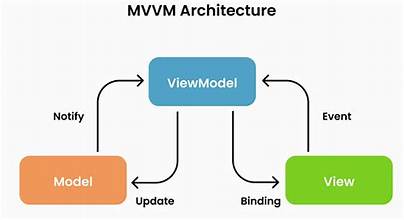
The Three Layers of MVVM
A practical enterprise architecture can be divided into:
┌─────────────────────────────┐
│            View             │
│ UI / Binding / Interaction  │
└──────────────┬──────────────┘
               │
               ▼
┌─────────────────────────────┐
│         ViewModel           │
│ State / Commands / Mapping  │
└──────────────┬──────────────┘
               │
               ▼
┌─────────────────────────────┐
│       Model / Services      │
│ Domain / Data / Networking  │
└─────────────────────────────┘
The ViewModel becomes the boundary between the user interface and the application.
This is especially useful in C++ because it keeps platform-specific UI frameworks away from core business code.
Establishing a One-Way Data Flow
A strict MVVM architecture benefits from predictable data flow.
A typical interaction looks like:
User
 ↓
View
 ↓
Command
 ↓
ViewModel
 ↓
Service
 ↓
Model
 ↓
ViewModel State
 ↓
View
The View does not directly modify business objects.
Instead, it expresses intent.
For example:
"The user selected account 42."
The ViewModel decides what that means.
This creates a cleaner separation between:
What the user did
and:
What the application should do about it.
Designing the Model Layer
The Model should represent the application's actual domain.
For example:
struct Account
{
    int id;
    std::string name;
    double balance;
};
The model should not know about:
Buttons
Windows
Screens
Dialogs
Widgets
UI events
Instead, it represents application concepts.
For more complex applications, separate the domain from infrastructure:
Domain
 ├── Entities
 ├── Value Objects
 └── Business Rules

Infrastructure
 ├── Database
 ├── HTTP
 ├── Files
 └── Platform APIs
This makes the core easier to test and reuse.
Keep Business Logic Out of the ViewModel
This is one of the most important distinctions.
The ViewModel should coordinate application behavior, but it should not become a giant replacement for the domain layer.
Bad:
void AccountViewModel::transferMoney(...)
{
    if (balance >= amount &&
        account.isActive() &&
        destination.isValid())
    {
        // dozens of business rules...
    }
}
A better approach is:
void AccountViewModel::transferMoney(...)
{
    transferService_->transfer(sourceId, destinationId, amount);
}
The business rules belong in the domain or application service.
The ViewModel translates user intent into application operations.
Designing the ViewModel
A ViewModel should expose information in a form the UI can consume easily.
For example:
class AccountViewModel
{
public:
    std::string accountName() const;
    std::string formattedBalance() const;

    void refresh();
    void transfer(double amount);
};
The ViewModel may transform:
Domain Value
     ↓
Presentation Value
For example:
10250.50could become:
"$10,250.50"The View should not need to understand business formatting rules or data transformation.
Keep the View Truly Passive
A strict View should focus on presentation.
It should not contain:
Database Queries
Business Rules
Network Requests
Domain Decisions
Instead:
View
 ├── Bind Text
 ├── Bind State
 └── Trigger Commands
The View observes ViewModel state.
When the state changes:
ViewModel
 ↓
State Changed
 ↓
View Updates
This creates a predictable UI lifecycle.
Commands and User Actions
User actions should be represented explicitly.
Instead of allowing the View to directly call a service:
Button
 ↓
PaymentService
use:
Button
 ↓
PayCommand
 ↓
ViewModel
 ↓
PaymentService
Commands can expose:
Execute
CanExecute
Progress
Error state
This becomes especially useful for asynchronous operations.
Example Command Model
Conceptually:
class Command
{
public:
    virtual bool canExecute() const = 0;
    virtual void execute() = 0;
};
A View can bind to the command without understanding the underlying business operation.
This allows the ViewModel to control whether an action is currently valid.
For example:
Form Invalid
 ↓
SubmitCommand.canExecute()
 ↓
false
 ↓
Button Disabled
State Management in C++
Reactive state is central to modern MVVM.
A ViewModel might expose:
Loading
Data
Error
Instead of scattering independent flags throughout the UI, model the state deliberately.
For example:
enum class LoadState
{
    Idle,
    Loading,
    Loaded,
    Failed
};
Then:
struct AccountState
{
    LoadState status;
    std::vector<Account> accounts;
    std::string errorMessage;
};
The View observes state changes rather than manually coordinating multiple variables.
Observable State
The exact implementation depends on the UI framework.
The architecture might use:
Signals and slots
Observers
Reactive streams
Callbacks
Property wrappers
The important principle is not the specific mechanism.
It is the dependency direction:
ViewModel State
      ↓
Observer / Binding
      ↓
View
Avoid making the ViewModel dependent on concrete UI widgets.
Dependency Injection and Ownership
C++ makes ownership an architectural concern.
A ViewModel should not create every service it needs internally.
Avoid:
AccountViewModel::AccountViewModel()
{
    database_ = std::make_unique<Database>();
    api_ = std::make_unique<ApiClient>();
}
This makes testing harder.
Prefer dependency injection:
AccountViewModel(
    AccountService& service,
    Logger& logger);
Now production code can provide real implementations while tests provide fakes.
Prefer Clear Ownership Rules
For each major object, determine:
Who creates it?
Who owns it?
How long does it live?
Who can access it?
A typical application might use:
Application
   ↓
Service Container
   ↓
Services
   ↓
ViewModels
The exact mechanism can vary.
The principle is to make ownership explicit rather than relying on accidental object lifetimes.
Asynchronous Operations and Threading
Cross-platform applications frequently perform:
Network requests
Database operations
File processing
Device communication
These operations should not block the UI thread.
A typical flow is:
View
 ↓
ViewModel
 ↓
Async Service
 ↓
Background Thread
 ↓
Result
 ↓
UI State Update
The ViewModel should expose states such as:
Idle
Loading
Success
Error
The UI then reacts to state rather than managing threads directly.
Be Careful With Thread Affinity
A common C++ UI failure is updating UI-observed state from the wrong thread.
For example:
Worker Thread
     ↓
ViewModel State
     ↓
UI
If the UI framework requires updates on its main thread, the state notification must be dispatched correctly.
The architecture should make this boundary explicit:
Background Work
      ↓
Result
      ↓
UI Thread Dispatcher
      ↓
ViewModel State
This avoids race conditions and difficult-to-reproduce crashes.
Platform Abstraction
One of the biggest benefits of strict MVVM is separating platform concerns.
Suppose the application needs:
File selection
Notifications
Bluetooth
Secure storage
Camera
The ViewModel should depend on an abstraction:
class SecureStorage
{
public:
    virtual ~SecureStorage() = default;

    virtual std::string read(std::string_view key) = 0;
    virtual void write(
        std::string_view key,
        std::string_view value) = 0;
};
Platform implementations can then provide:
SecureStorage
      │
 ┌────┼─────┐
 ▼    ▼     ▼
Win  macOS  Linux
The shared application logic remains portable.
Avoid Platform Code in ViewModels
This:
#ifdef _WIN32
    // Windows API
#endif
inside a ViewModel is usually a warning sign.
Prefer:
ViewModel
   ↓
Platform Interface
   ↓
Windows Implementation
This keeps the ViewModel portable and testable.
Error Handling
Enterprise applications need predictable error behavior.
Do not expose low-level infrastructure errors directly to the UI.
For example:
HTTP 503is not necessarily useful to the user.
The application layer can translate it into:
"Service temporarily unavailable. Please try again."The ViewModel can then expose:
Error State
+
User-Friendly Message
+
Retry Command
This creates a better boundary between infrastructure and presentation.
Testing the ViewModel
One of the biggest advantages of MVVM is testability.
You should be able to test:
ViewModel
   ↓
Fake Service
   ↓
Expected State
without launching the UI.
For example:
TEST(AccountViewModel, LoadsAccounts)
{
    FakeAccountService service;
    AccountViewModel vm(service);

    vm.refresh();

    EXPECT_EQ(vm.accounts().size(), 3);
}
The exact test framework does not matter.
The important property is that the test does not require:
A window
A real database
A real network
A specific operating system
Test User Intent, Not UI Details
Good ViewModel tests should focus on behavior.
Examples:
When login succeeds
→ authenticated state is exposed

When login fails
→ error state is exposed

When request is loading
→ submit action is disabled

When data refreshes
→ updated state is published
This gives you a stable test suite even when the UI changes.
Scaling MVVM Across Large Applications
A large application should not become one enormous ViewModel hierarchy.
Organize around business domains.
For example:
Application
│
├── Accounts
│   ├── Views
│   ├── ViewModels
│   └── Services
│
├── Orders
│   ├── Views
│   ├── ViewModels
│   └── Services
│
└── Reporting
    ├── Views
    ├── ViewModels
    └── Services
This makes ownership clearer.
Keep ViewModels Focused
A ViewModel should represent a meaningful presentation context.
Avoid:
MainViewModel
 ├── Login
 ├── Payments
 ├── Reports
 ├── Settings
 ├── Users
 └── Everything Else
Prefer:
LoginViewModel
PaymentViewModel
ReportViewModel
SettingsViewModel
Small, focused ViewModels are easier to test and maintain.
Common MVVM Mistakes
Creating a "God ViewModel"
A giant ViewModel becomes a new form of spaghetti architecture.
Putting Business Logic in the View
UI code should not decide core business rules.
Putting Everything in the ViewModel
The ViewModel should coordinate presentation, not become the entire application.
Direct UI References
Avoid storing pointers to concrete buttons, labels, windows, or screens inside ViewModels.
Creating Dependencies Internally
Hard-coded service creation makes testing and replacement difficult.
Ignoring Threading
Asynchronous C++ code can easily create race conditions if UI state updates are not carefully controlled.
Using Shared Mutable State Everywhere
Global state makes application behavior difficult to reason about.
Overengineering the Binding Layer
The architecture should remain understandable. A complicated reactive framework is not automatically better.
A Modern Cross-Platform MVVM Architecture
A scalable architecture might look like:
                   Platform UI
              ┌───────┼───────┐
              ▼       ▼       ▼
           Windows  macOS   Linux
              │       │       │
              └───────┼───────┘
                      ▼
                 ViewModels
                      │
              ┌───────┼───────┐
              ▼       ▼       ▼
          Commands  State  Presentation
                      │
                      ▼
                Application Layer
                      │
             ┌────────┼────────┐
             ▼        ▼        ▼
          Domain   Services  Policies
             │        │
             └────────┼────────┘
                      ▼
                Infrastructure
             ┌────────┼────────┐
             ▼        ▼        ▼
          Database   HTTP   Platform APIs
The critical dependency direction is:
UI
 ↓
ViewModel
 ↓
Application
 ↓
Domain
 ↓
Infrastructure
Core logic should not depend on the UI framework.
How to Introduce Strict MVVM Into an Existing Application
A complete rewrite is rarely necessary.
Step 1 — Identify UI/Business Coupling
Find code where UI classes directly perform:
Database operations
Network requests
Business calculations
File operations
Step 2 — Extract Services
Move application operations into testable service interfaces.
UI Code
 ↓
Service Interface
 ↓
Implementation
Step 3 — Introduce ViewModels
Create ViewModels around major user workflows.
Step 4 — Move Presentation State
Move:
Loading state
Validation state
Error state
Selection state
into the ViewModel.
Step 5 — Introduce Commands
Convert UI event handlers into explicit application intents.
Step 6 — Add Observable State
Choose an appropriate notification mechanism for the UI framework.
Step 7 — Abstract Platform APIs
Move operating-system-specific behavior behind interfaces.
Step 8 — Add ViewModel Tests
Test critical workflows without the UI.
Step 9 — Remove Direct Dependencies
Gradually eliminate:
View → Database
View → Network
View → Business Logic
Step 10 — Enforce Architectural Boundaries
Document and review dependency rules.
Architecture only works when the team consistently follows it.
Measuring Architectural Success
Strict MVVM should produce measurable improvements.
Testability
More logic tested without UI
Faster test execution
Fewer integration-only tests
Maintainability
Smaller ViewModels
Fewer UI dependencies
Clearer service boundaries
Portability
More shared code
Fewer platform-specific branches
Reliability
Fewer threading issues
More predictable state transitions
Developer Experience
Easier onboarding
Clearer ownership
Safer refactoring
The architecture should make everyday development easier.
Making the Call
Before adopting strict MVVM, engineering teams should ask:
Which application logic needs to be shared across platforms?
Where is the current UI tightly coupled to business logic?
Which platform APIs need abstraction?
How will ViewModel state be observed safely across threads?
Can our ViewModels be tested without launching the UI?
Who owns service lifetimes and dependencies?
How will the architecture scale as the application grows?
Most importantly:
Are we implementing MVVM to create clear boundaries—or simply adding ViewModel classes to an already coupled codebase?
The difference is significant.
Final Takeaway
Strict MVVM in cross-platform C++ is less about a particular framework and more about enforcing a disciplined flow of responsibility.
A healthy architecture looks like:
User
 ↓
View
 ↓
Command
 ↓
ViewModel
 ↓
Application Service
 ↓
Domain
 ↓
Infrastructure
The result flows back in the opposite direction:
Infrastructure
 ↓
Domain / Service
 ↓
ViewModel State
 ↓
Binding / Observer
 ↓
View
The View focuses on presentation.
The ViewModel manages presentation state and user intent.
The application layer coordinates use cases.
The domain owns business rules.
Infrastructure handles databases, networking, files, and platform services.
That separation is particularly valuable in C++ because platform boundaries, memory ownership, threading, and native APIs can otherwise leak into every layer of the application.
The biggest benefit is not simply cleaner code.
It is freedom to change one part without destabilizing everything else.
You can redesign the Windows interface without rewriting business rules.
You can introduce a macOS frontend without duplicating application logic.
You can replace a networking implementation without rewriting the View.
You can test complex workflows without opening a window.
You can move platform services behind new implementations without changing the core application.
That is the real power of strict MVVM.
The goal is not to make every C++ class fit neatly into Model, View, or ViewModel. The goal is to create boundaries strong enough that UI, business logic, infrastructure, and platform code can evolve independently.
For cross-platform applications expected to survive years of development, that independence becomes increasingly valuable.
The architecture ultimately becomes:
Platform-specific where experience matters.
Platform-independent where business logic matters.
Explicit where dependencies matter.
Reactive where state changes.
Asynchronous where work is expensive.
Testable where correctness matters.
And when those principles are applied consistently, C++ can provide something many cross-platform teams struggle to achieve:
One shared application core with platform-appropriate experiences on top.
That is what makes strict MVVM more than a design pattern.
It becomes an architectural strategy for keeping complex cross-platform applications understandable, testable, and adaptable as they grow.
Frequently Asked Questions
Need a product built?
We build custom software, mobile apps, and web platforms for startups and enterprises.



Their team became an extension of ours — within months they'd rebuilt our entire product experience from the ground up.
